Comtech-ef-data CDD-562AL Uživatelský manuál Strana 237
- Strana / 240
- Tabulka s obsahem
- KNIHY

- CDD-562AL/564A/L 1
- TABLE OF CONTENTS 5
- FIGURES 11
- PREFACE 13
- Electrical Installation 14
- Grounding 14
- Operating Environment 15
- (91/263/EEC) 16
- CE Mark 16
- Product Support 17
- Comtech EF Data Headquarters 17
- Warranty Policy 18
- Limitations of Warranty 18
- Exclusive Remedies 18
- Chapter 1. INTRODUCTION 19
- 1.1.1 CDD-56xA/L Features 20
- 1.2 Functional Description 20
- 1.3 Features 23
- 1.3.1 Physical Description 23
- 1.3.2 Major Assemblies 23
- 1.3.4 Dimensional Envelopes 24
- 1.3.5 Physical Features 27
- 1.3.5.1 Front Panel 27
- 1.3.5.2 Rear Panel 28
- 1.3.6 Data Interfaces 30
- 1.4.1 Demodulator 32
- 1.4.2 Data Rate Ranges 36
- Parameters Specifications 37
- 1.4.5 Network Protocols 38
- Chapter 2. INSTALLATION and 39
- STARTUP 39
- 2.3 Initial Configuration 43
- Chapter 3. REAR PANEL 45
- CONNECTOR PINOUTS 45
- 3.2.1 Rx IF Connections 47
- 3.2.1.1 CDD-562AL 47
- 3.2.3 Utility Connections 49
- INTERFACE 55
- DVB Encapsulator 64
- Chapter 5. UPDATING FIRMWARE 69
- F0020894–_V131 71
- Chapter 6. FAST ACTIVATION 79
- PROCEDURE 79
- Chapter 7. ETHERNET-BASED 83
- REMOTE PRODUCT 83
- MANAGEMENT 83
- 7.3.6 SNMP Traps 85
- 7.3.7 MIB-II 86
- 7.3.8 Private MIB 87
- 7.3.8.6.1 Unit Monitor 91
- 7.3.8.6.2 Rx Monitor 91
- 7.3.8.6.3 LNB Monitor 91
- 7.4 Telnet Interface 91
- Chapter 8. QUICK START GUIDE 93
- CDD-564A/L Demodulator 98
- BLANK PAGE 102
- Chapter 9. TELNET and CLI 103
- OPERATION 103
- 9.2 CLI Menu Screens 105
- 9.2.2 Main Menu 106
- 9.2.2.1.6 Working Mode 118
- 9.2.2.1.7 Telnet Timeout 119
- Management System (VMS) 130
- • Select one: 136
- 9.2.2.6.2 Monitor screen 137
- 9.2.2.6.4 Features screen 141
- 9.2.2.6.5 Utilities screen 142
- 9.2.2.7.2 Statistics Menu 147
- 9.2.2.7.3 Event Log screen 161
- 10.1 Introduction 167
- 10.1.2 Navigation 168
- 10.1.3 Page Sections 168
- 10.1.4 Action Buttons 168
- 10.1.5 Drop-down menus 169
- 10.1.6 Text Boxes 169
- 10.2.1 Select a Demodulator 171
- 10.3 Home pages 171
- 10.3.1 Home 171
- 10.3.2 Home 172
- 10.4.1 Admin 173
- Host Access List 174
- 10.4.2 Admin 175
- 10.4.3 Admin 176
- 10.4.4 Admin 177
- Features – Optional 178
- R x Header Decompression 178
- 10.4.5 Admin 180
- 10.4.6 Admin 181
- 10.4.7 Admin 182
- 10.4.8 Admin 183
- 10.5 Configuration pages 184
- Alarm Mask 186
- 10.5.2 Configuration 187
- Port Configuration 188
- VL A N B router 188
- 10.5.3 Configuration 189
- AR P Table (E dit) 190
- Add S tatic AR P 190
- Delete S tatic AR P 190
- Flush Dynamic AR P 190
- R oute Table (E dit) 191
- Add New R oute 192
- Delete R oute 193
- CDD-56xAL as S erver 194
- IGMP Table 194
- Decryption 195
- R eceive K eys 195
- R eceive HDLC Address es 196
- Delete HDLC Address 197
- Utilities 198
- LNB Control 200
- 10.6 Status pages 201
- 10.6.4 Status 203
- 10.6.9 Status 207
- Appendix A. Forward Error 209
- Correction (FEC) Options 209
- A.3 VersaFEC 211
- (Short-block LDPC) 211
- A.3.1 VersaFEC Extensions 213
- A.3.1.1 Extended CCM Codes 213
- Comtech Turbo Product Codec 216
- Rate 5/16 BPSK 216
- Rate 21/44 BPSK/QPSK 217
- Rate 3/4 QPSK 218
- 8-PSK/8-QAM and 16-QAM 218
- Rate 7/8 QPSK 219
- Rate 0.95 QPSK 220
- Comtech VersaFEC® Codec 221
- Rate 0.488 BPSK 221
- Rate 0.533, 0.631, 0.706 222
- Rate 0.642, 0.711, 0.780 223
- Rate 0.731, 0.780, 0.829 224
- Comtech VersaFEC® 225
- Codec - Extended CCM 225
- 0.576 8-QAM and 225
- 0.644 16-QAM 225
- BPSK/QPSK 226
- 0.654 and 0.734 QPSK 226
- Comtech Ultra-Low-Latency 226
- (ULL) Codec - Rate 0.493 226
- Differential 227
- Encoding 227
- No FEC, no 227
- Blank Page 228
- Appendix B. E 229
- MEASUREMENT 229
- (Co+No/No )/10) 230
- Appendix C. CDD-564A/L 233
- Dedicated Management Port 233
- C.2 Description 234
- C.3 Configuration 234
- Vipersat) 236
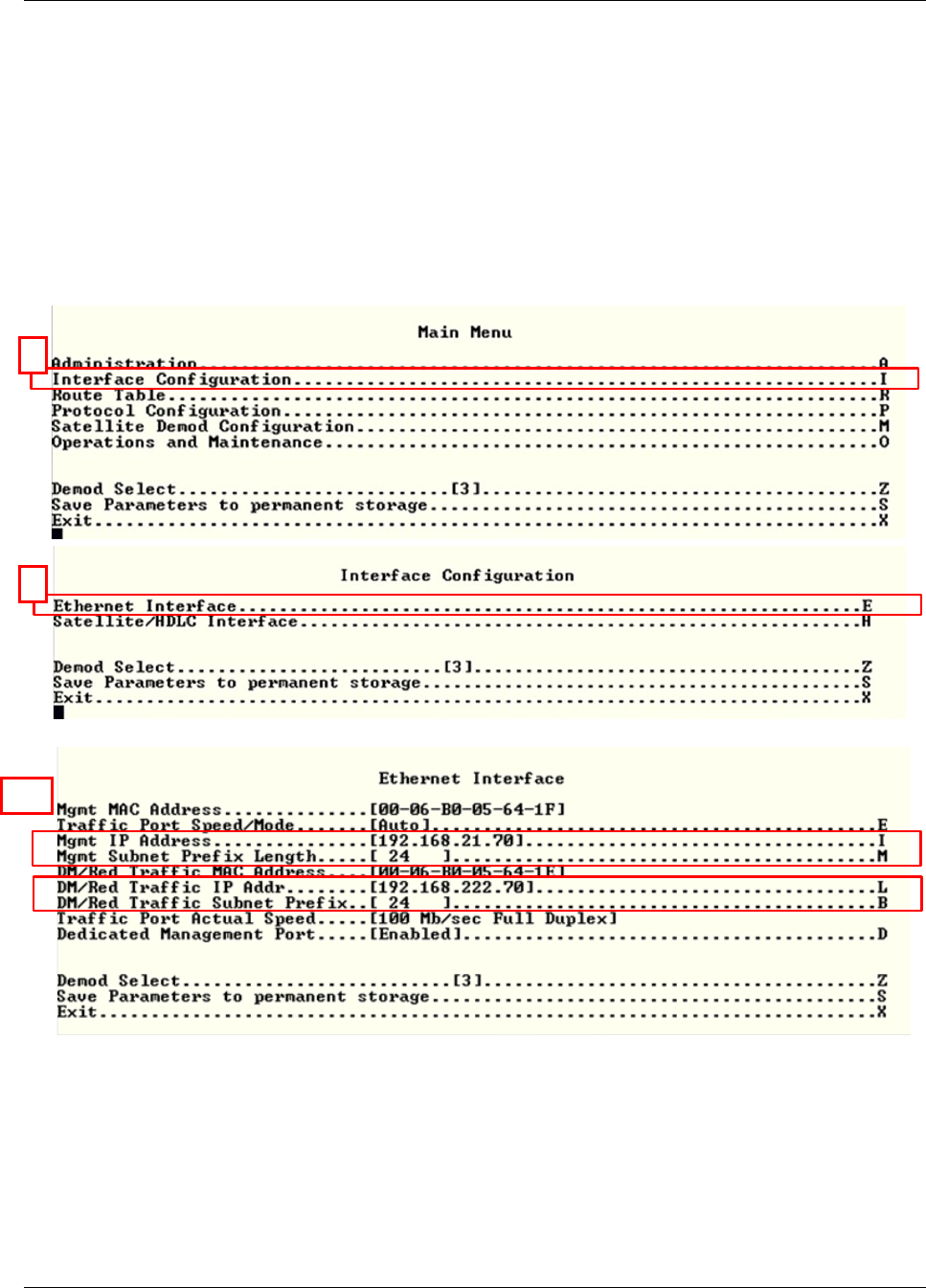
- See Figure C-5: 237
- 480 • 333 • 2200 PHONE 240
- • 333 • 2161 FAX 240
Související produkty a manuály pro Zařízení Comtech-ef-data CDD-562AL
 (254 stránky)
(134 stránky)
(618 stránky)
(4 stránky)
(96 stránky)
(188 stránky)
(342 stránky)
(220 stránky)
(87 stránky)
(196 stránky)
(192 stránky)
(78 stránky)
(254 stránky)
(134 stránky)
(618 stránky)
(4 stránky)
(96 stránky)
(188 stránky)
(342 stránky)
(220 stránky)
(87 stránky)
(196 stránky)
(192 stránky)
(78 stránky)
© 2020, manymanuals.cz. Všechna práva vyhrazena. | 0.043 s |
 Manymanuals.com
 Manymanuals.de
 Manymanuals.fr
 Manymanuals.it
 Manymanuals.pl
 Manymanuals.cz
 Manymanuals.es
 Manymanuals-pt.com
Komentáře k této Příručce