Comtech-ef-data OM20 Uživatelský manuál Strana 132
- Strana / 220
- Tabulka s obsahem
- ŘEŠENÍ PROBLÉMŮ
- KNIHY

- Universal Outdoor Modem 1
- Table of Contents 5
- PREFACE 11
- Cautions and Warnings 12
- Trademarks 12
- Safety Compliance 13
- EN 60950 13
- Low Voltage Directive (LVD) 13
- Warranty Policy 14
- Limitations of Warranty 14
- Exclusive Remedies 15
- Customer Support 16
- Online Customer Support 16
- Chapter 1. Introduction 17
- 1.1 OM20 Configurations 18
- MN-OM20– Revision 5 1–4 20
- Chapter 2. Installation 21
- 2.2 Unpacking 22
- 2.2.1 Outdoor Modem (OM20) 22
- 2.3 Removal and Assembly 23
- MN-OM20– Revision 5 2–4 24
- MN-OM20– Revision 5 2–5 25
- MN-OM20– Revision 5 2–6 26
- MN-OM20– Revision 5 2–7 27
- MN-OM20– Revision 5 2–8 28
- MN-OM20– Revision 5 2–9 29
- MN-OM20– Revision 5 2–10 30
- MN-OM20– Revision 5 2–11 31
- MN-OM20– Revision 5 2–12 32
- MN-OM20– Revision 5 3–1 33
- IP M&C Default Reset 34
- MN-OM20– Revision 5 3–3 35
- MN-OM20– Revision 5 3–4 36
- 3.4 Storage and Reshipment 37
- MN-OM20– Revision 5 3–6 38
- 4.1 OM20 Hardware 39
- MN-OM20– Revision 5 4–2 40
- 4.2.1 Baseband Processing 42
- MN-OM20– Revision 5 4–5 43
- 4.3.1 Terminal Port 45
- 4.3.3 Ethernet M&C Port 45
- 4.3.4 Modem Monitor Status 46
- 4.5 Internal Clock 46
- MN-OM20– Revision 5 4–10 48
- MN-OM20– Revision 5 4–11 49
- 4.7 Clocking Options 50
- 4.7.1 TX Clock Options 50
- 4.7.2.1 RX SAT Clock 52
- 4.7.2.4 EXT CLK/EXT BNC: 52
- MN-OM20– Revision 5 4–15 53
- 4.9 Reed-Solomon Codec 54
- 4.9.3 Interleaving 54
- MN-OM20– Revision 5 4–17 55
- MN-OM20– Revision 5 4–18 56
- 4.13 Standard IBS Mode 57
- MN-OM20– Revision 5 4–20 58
- 4.15 ESC Backward Alarms 59
- 4.16.1 SCC Framing Structure 60
- 4.16.2 Aggregate Data Rate 61
- MN-OM20– Revision 5 4–24 62
- MN-OM20– Revision 5 4–25 63
- MN-OM20– Revision 5 4–26 64
- 4.19 Strap Codes 65
- MN-OM20– Revision 5 4–28 66
- MN-OM20– Revision 5 5–1 67
- MN-OM20– Revision 5 5–2 68
- 5.1.1 Power Input 69
- MN-OM20– Revision 5 5–4 70
- Balanced Data I/O Port (J3) 71
- 5.1.5 Ground Lug (J6) 73
- 5.1.6 RX L-Band IF (J7) 73
- 5.1.7 TX L-Band IF (J8) 73
- MN-OM20– Revision 5 5–8 74
- Protocol 75
- 6.2.1 Appearance 76
- 6.2.2 Navigation 77
- 6.2.3 LED Indicators 78
- 6.3 GUI Screen Menus 79
- 6.3.1 Introduction Menu 80
- 6.3.1.1 Login Screen 81
- 6.3.2 Password Setup 82
- MN-OM20– Revision 5 6–9 83
- 6.3.3.1 Modem Addressing 84
- MN-OM20– Revision 5 6–11 85
- MN-OM20– Revision 5 6–12 86
- Table 6-5. SNMP Parameters 87
- MN-OM20– Revision 5 6–14 88
- MN-OM20– Revision 5 6–15 89
- 6.3.4.1 Transmit Menu 90
- MN-OM20– Revision 5 6–17 91
- MN-OM20– Revision 5 6–18 92
- MN-OM20– Revision 5 6–19 93
- MN-OM20– Revision 5 6–20 94
- MN-OM20– Revision 5 6–21 95
- MN-OM20– Revision 5 6–22 96
- MN-OM20– Revision 5 6–24 98
- MN-OM20– Revision 5 6–25 99
- MN-OM20– Revision 5 6–26 100
- MN-OM20– Revision 5 6–27 101
- IM PO RTA NT 102
- 6.3.4.2 Receive Menu 103
- MN-OM20– Revision 5 6–30 104
- MN-OM20– Revision 5 6–31 105
- MN-OM20– Revision 5 6–32 106
- MN-OM20– Revision 5 6–33 107
- MN-OM20– Revision 5 6–34 108
- MN-OM20– Revision 5 6–35 109
- MN-OM20– Revision 5 6–36 110
- 6.3.4.3 Interface Menu 111
- MN-OM20– Revision 5 6–38 112
- MN-OM20– Revision 5 6–39 113
- MN-OM20– Revision 5 6–40 114
- MN-OM20– Revision 5 6–41 115
- MN-OM20– Revision 5 6–42 116
- MN-OM20– Revision 5 6–43 117
- 6.3.4.4 Monitor Menu 118
- MN-OM20– Revision 5 6–45 119
- MN-OM20– Revision 5 6–46 120
- MN-OM20– Revision 5 6–47 121
- MN-OM20– Revision 5 6–48 122
- 6.3.4.5 Alarms Menu 123
- MN-OM20– Revision 5 6–50 124
- MN-OM20– Revision 5 6–51 125
- MN-OM20– Revision 5 6–52 126
- MN-OM20– Revision 5 6–53 127
- MN-OM20– Revision 5 6–54 128
- MN-OM20– Revision 5 6–55 129
- 6.3.4.6 System Menu 130
- MN-OM20– Revision 5 6–57 131
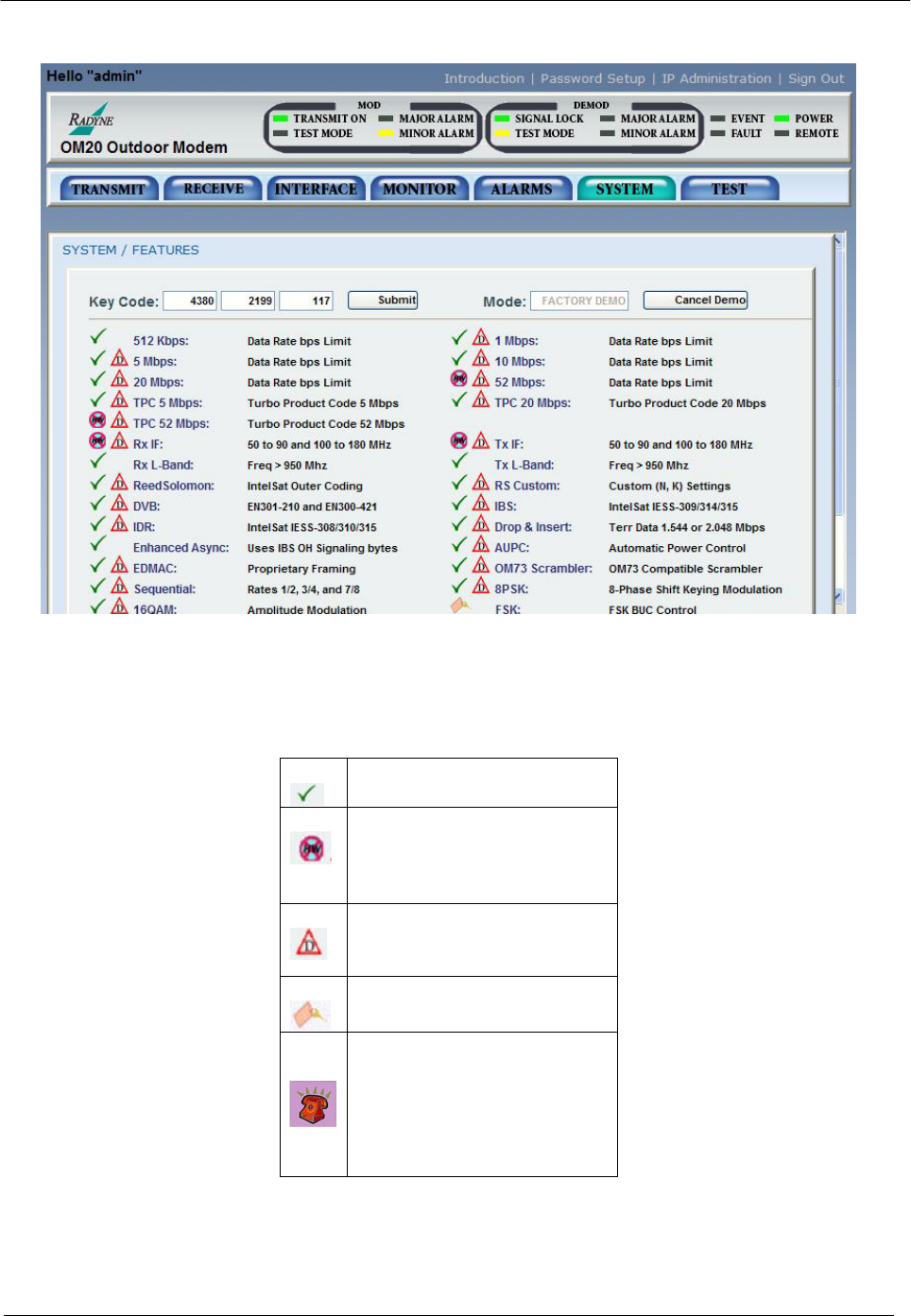
- MN-OM20– Revision 5 6–58 132
- 6.3.4.7 Test Menu 133
- 6.4.1 Ethernet Flow Control 134
- 6.4.2 Packet Statistics 135
- 6.5 Terminal Mode Control 136
- MN-OM20– Revision 5 6–63 137
- MN-OM20– Revision 5 6–64 138
- Chapter 7. Maintenance and 139
- Troubleshooting 139
- 7.2.1 Alarm Faults 140
- 7.2.1.1 Major Tx Alarms 140
- 7.2.1.2 Major Rx Alarms 141
- 7.2.1.3 Minor Tx Alarms 141
- 7.2.1.4 Minor Rx Alarms 142
- 7.2.2 Alarm Masks 143
- 7.2.2.1 Active Alarms 144
- 7.2.2.1.1 Major Alarms 144
- 7.2.2.1.2 Minor Alarms 144
- 7.2.2.2 Latched Alarms 144
- 8.1 Data Rates 145
- 8.2 Modulator 145
- 8.3 Demodulator 146
- 8.4 Plesiochronous Buffer 146
- 8.5 Monitor and Control 146
- MN-OM20– Revision 5 8–3 147
- MN-OM20– Revision 5 8–4 148
- 8.12.2 DVB 149
- MN-OM20– Revision 5 8–6 150
- Viterbi 151
- 151
- Sequential 152
- Viterbi Decoder 153
- Reed Solomon 153
- Trellis 154
- Viterbi Decoder 156
- Turbo Decoder 157
- MN-OM20– Revision 5 8–16 160
- MN-OM20– Revision 5 8–17 161
- MN-OM20– Revision 5 8–18 162
- 8.13.10 Input Level 163
- MN-OM20– Revision 5 8–20 164
- Appendix A. Product Options 165
- A.2 Customized Options 166
- Procedure 167
- MN-OM20– Revision 5 B–2 168
- B.4 Demonstration Procedure 169
- MN-OM20– Revision 5 B–4 170
- B.7 Monitor and Control 171
- MN-OM20– Revision 5 B–6 172
- Appendix C. Carrier Control 173
- C.4 Carrier Auto 174
- C.5 Carrier VSat 174
- C.6 Carrier RTS 174
- D.2 Required Items 175
- D.1 Introduction 175
- MN-OM20– Revision 5 D–2 176
- MN-OM20– Revision 5 D–3 177
- D.4.1 Configuring the modem 178
- MN-OM20– Revision 5 D–5 179
- MN-OM20– Revision 5 D–6 180
- MN-OM20– Revision 5 D–7 181
- MN-OM20– Revision 5 D–8 182
- MN-OM20– Revision 5 E–1 183
- E.2 Drop Only 184
- E.3 Insert Only 184
- E.4 Mode Selection 185
- E.4.1 PCM-30 185
- E.4.2 PCM-30C 185
- E.4.3 PCM-31 186
- E.4.4 PCM-31C 186
- E.4.5 T1-D4/T1-D4-S 186
- E.4.6 T1-ESF/T1-ESF-S 186
- E.6 Drop and Insert Mapping 187
- MN-OM20– Revision 5 E–6 188
- E.7.1 Data Rate 189
- MN-OM20– Revision 5 E–8 190
- MN-OM20– Revision 5 E–9 191
- MN-OM20– Revision 5 E–10 192
- MN-OM20– Revision 5 E–11 193
- MN-OM20– Revision 5 E–12 194
- MN-OM20– Revision 5 E–13 195
- MN-OM20– Revision 5 E–14 196
- MN-OM20– Revision 5 E–15 197
- MN-OM20– Revision 5 E–16 198
- Appendix F. Efficient 199
- Drop & Insert (D&I) 199
- MN-OM20– Revision 5 F–2 200
- MN-OM20– Revision 5 F–3 201
- Overhead 202
- MN-OM20– Revision 5 F–5 203
- MN-OM20– Revision 5 F–6 204
- Appendix G. Strap Codes 205
- G.2 Sample Applications 209
- MN-OM20– Revision 5 G–6 210
- MN-OM20– Revision 5 G–7 211
- MN-OM20– Revision 5 G–8 212
- MN-OM20– Revision 5 G–9 213
- MN-OM20– Revision 5 G–10 214
- Appendix H. AUPC Operations 215
- H.1.2 EF AUPC 216
- H.1.3 Near Side AUPC 216
- MN-OM20– Revision 5 H–3 217
- MN-OM20– Revision 5 H–4 218
- METRIC CONVERSIONS 219
- Units of Length 219
- Temperature Conversions 219
- Units of Weight 219
- 480 • 333 • 2200 PHONE 220
- • 333 • 2161 FAX 220
Související produkty a manuály pro Zařízení Comtech-ef-data OM20
 (87 stránky)
(196 stránky)
(192 stránky)
(78 stránky)
(212 stránky)
(64 stránky)
(172 stránky)
(136 stránky)
(124 stránky)
(186 stránky)
(26 stránky)
(218 stránky)
(196 stránky)
(90 stránky)
(20 stránky)
(87 stránky)
(196 stránky)
(192 stránky)
(78 stránky)
(212 stránky)
(64 stránky)
(172 stránky)
(136 stránky)
(124 stránky)
(186 stránky)
(26 stránky)
(218 stránky)
(196 stránky)
(90 stránky)
(20 stránky)
© 2020, manymanuals.cz. Všechna práva vyhrazena. | 0.085 s |
 Manymanuals.com
 Manymanuals.de
 Manymanuals.fr
 Manymanuals.it
 Manymanuals.pl
 Manymanuals.cz
 Manymanuals.es
 Manymanuals-pt.com
Komentáře k této Příručce